 Discord
Poll
 Loading ...
Posted by dOoBiX on August 19th, 2010 at 2:41 am
You can use this program to change your Warcraft 3 CD-Key without reinstalling.
Warcraft 3 RoC and TFT CD-Key Changers (187591 downloads)To change your Reign of Chaos CD key
Please close Warcraft 3 and follow these steps:
1. Open the zip file and run cdkey.exe.
2. Click “Change CD Key”.
3. Enter your Name and the new CD key that you wish to use, and click OK.
4. Done.
To change your Frozen Throne CD key
Please close Warcraft 3 and follow these steps:
1. Open the zip file and run FTkey.exe.
2. Click “Change CD-Key”.
3. Enter your new CD-key that you wish to use, and click OK.
4. Done.
There is no “Change CD Key” button?
If you don’t see the Change CD Key button, that means you need to fix the registry. You can download the Warcraft 3 Fixer utility below to help. Just run W3Fixer.exe, click Fix, and select where your WC3 folder is located at (usually “C:\Program Files\Warcraft III”).

Posted by dOoBiX on August 19th, 2008 at 10:13 pm
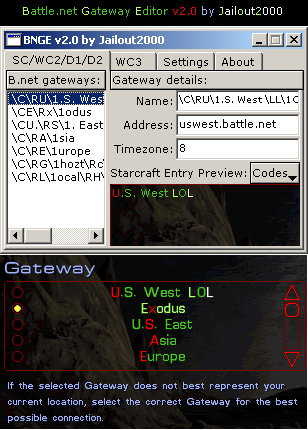 Here’s version 2.0d of Jailout2000’s BNGE! New features include Warcraft 3 support, a preview window for servers in StarCraft, and some other stuff you can read in the spoiler. This program also has the same features from the previous version: allows you to add/edit/remove Battle.net servers for StarCraft/Warcraft 2/Diablo 2, put color and formatting to the server names, and restore the original Battle.net gateways if your server list get messed up somehow.
Posted by dOoBiX on July 30th, 2008 at 4:40 pm
Use this program if you need a Warcraft III Reign of Chaos or Frozen Throne CD key. You can only use these CD keys to play on Single Player; the keys do not work for Battle.net.
Warcraft III The Frozen Throne Keygen (152307 downloads) Mirror Download: Megaupload
Posted by dOoBiX on July 30th, 2008 at 4:35 pm
This program will show what CD Key your Warcraft 3 Reign of Chaos/The Frozen Throne is using. Useful if you have lost your CD key. To use this, open WC3 first, click Local Area Network, and open the key grabber.
W3 / W3X CDKey Grabber (29748 downloads) Mirror Download: Megaupload
Posted by dOoBiX on May 6th, 2008 at 6:58 pm
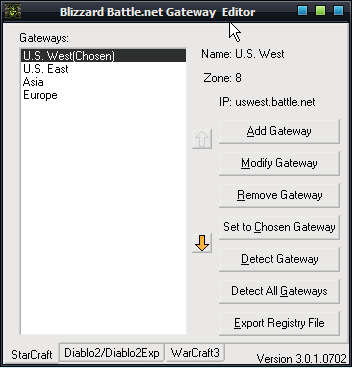
This simple Blizzard Battle.net Gateway Editor is made by Quixotic Yawl Studio. It allows you to add/edit/remove the Battle.net servers for StarCraft, Diablo 2, and Warcraft 3.
Blizzard Battle.net Gateway Editor (323251 downloads)Posted by dOoBiX on April 6th, 2008 at 12:14 am
Play Warcraft III Frozen Throne without a No-CD Crack!
First download this program called Daemon Tools:
DAEMON Tools Lite (8645 downloads)
and download the mini Frozen Throne ISO:
Mini Frozen Throne ISO (8930 downloads)
Install Daemon Tools, set 1 or more Virtual CD-ROM drives, and then Mount the Mini Frozen Throne ISO to a virtual drive that you created.
TA-DA! Now you can play The Frozen Throne with no CD in your CD-ROM drive because it is in your Virtual drive!
Note: This ISO is not a real Frozen Throne CD, thus it can’t be used to install the game. It is used to trick the game to think that the CD is in the CD-ROM drive.